 The Headteacher’s Report
 MAT Intel
 SEF Pro
 SEND Report
 Pupil Premium Report
 School Website Compliance
 mySchoolWellbeing
 CSED/SIAMS Reports
Interactive dashboard
See current grades in the scorecard, review previous evaluations and targets, and open the narrative and evidence behind each area.
Use presentation view in meetings or print the level of detail you need.
Bring leadership judgements, supporting evidence and available MIS data together in a clear SEF report and interactive dashboard. Use AI Suggested Text to help draft your evaluation, then review, refine and share it with colleagues, governors and trustees.
Prefer a walkthrough? Book an online overview →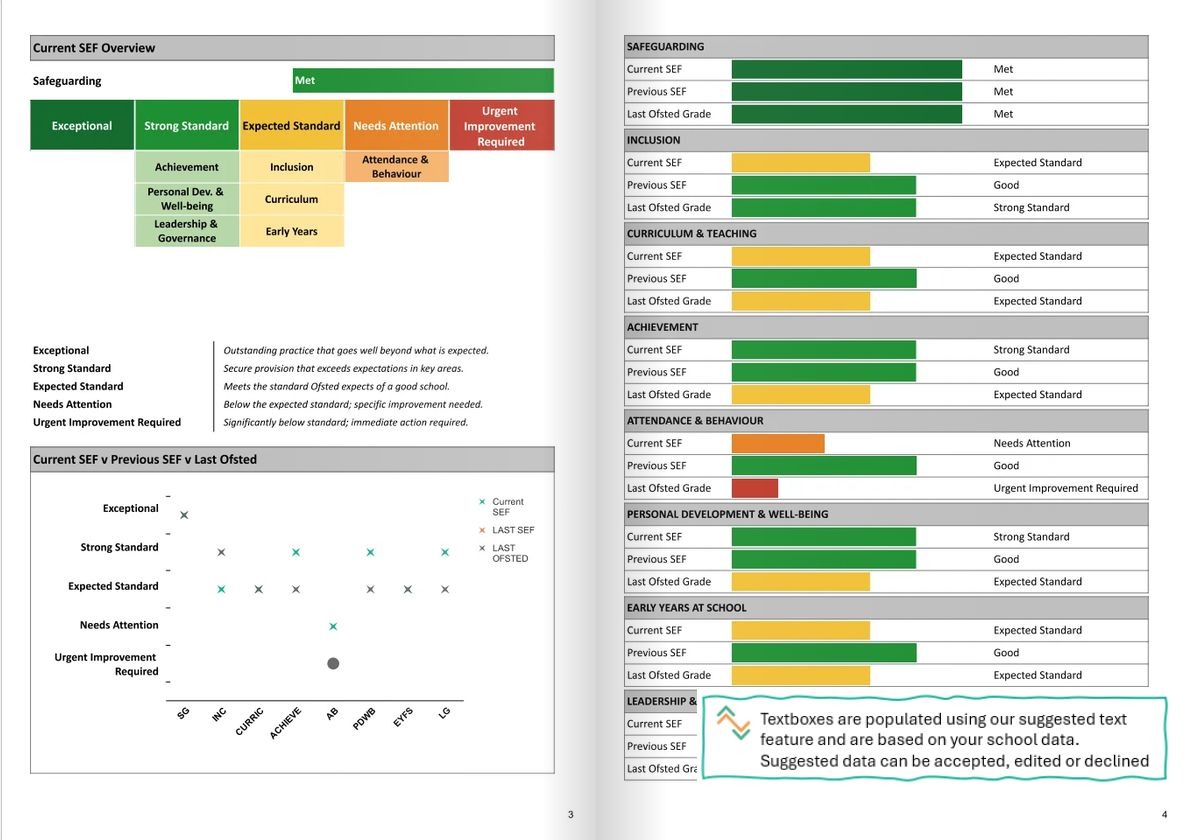
A visual overview for discussion, the written detail behind it and a supporting plan for the next steps.
See current grades in the scorecard, review previous evaluations and targets, and open the narrative and evidence behind each area.
Use presentation view in meetings or print the level of detail you need.
Bring the school’s judgements, strengths, supporting evidence and development priorities together in a structured written report.
Review the suggested wording and make it your school’s evaluation before sharing it.
Use the supporting school development plan report alongside your evaluation to organise priorities and guide follow-up discussion.
Keep the reasons for improvement and the next steps together.
The live example uses demonstration data. Try the Edit buttons to explore a temporary working copy; those changes do not update the source report and are lost when the page reloads.
Spend less time assembling the report and more time discussing what the evidence means for your school.
Focused questions and supporting evidence help leaders build their evaluation without starting from a blank page.
Available MIS data adds pupil context and attendance information alongside the school’s evaluation.
Use the visual scorecard and expandable detail to guide conversations with colleagues, governors and trustees.
Review and refine AI Suggested Text while retaining control of the grades, evidence and final narrative.
Use the dashboard for the headline picture and the written report for the supporting detail. The school remains in control of what it says.
School information provides context. Leaders supply the evidence and professional judgement that make the evaluation meaningful.
Pupil characteristics and attendance information help set the school’s evaluation in context, reducing the need to assemble those figures again.
Availability depends on the MIS connection, permissions and report setup.Leaders record current judgements and respond to focused questions. Supporting notes explain the evidence, variation across the school and the impact of action.
The school retains responsibility for its judgements and priorities.Suggested Text helps turn the information supplied to each section into draft narrative. Review the wording, check the evidence and edit it before sharing.
AI supports drafting; it does not replace leadership evaluation.Combine existing information with leadership evidence, review the suggested wording and choose how to share the evaluation.
Check available MIS information, work through the evaluation questions and record the school’s current judgements.
Add the evidence behind your responses. Review AI Suggested Text, edit the wording and record the next steps that matter.
Explore the dashboard in meetings and produce the written SEF and supporting development plan for further discussion and follow-up.
Feedback from schools and trusts using our reporting tools to make evaluation, reporting and governance more manageable.
The whole process has been much more straightforward.
Ian Tett · Headteacher · Oakgrove School
Governors really value it.
Peter Box · CEO · Herefordshire Marches Federation of Academies
I cannot praise highly enough the service received.
Gary Birkett · Headteacher · Newbarns Primary & Nursery School
Unlimited users, training and ongoing support are included.
£190 per year
A flexible annual subscription for your school.
Includes unlimited users, report updates, training and ongoing support.
£150 per year
Three-year subscription, billed annually.
Includes unlimited users, report updates, training and ongoing support.
No. School leaders enter and review their own judgements. SEF Pro helps organise the evidence and draft the narrative; leaders remain responsible for the evaluation and final wording.
Available pupil context and attendance information can be brought into the report through the school’s MIS connection. Availability depends on the supported platform, permissions and report setup. Leadership evaluations, evidence and priorities still need school input.
It uses the information supplied to the relevant section to help draft the evaluation. Leaders should add supporting evidence, check factual claims and accept, edit or decline the suggested wording. Available MIS data provides context where included in that section’s inputs.
Yes. The scorecard gives a visual overview, while expandable sections provide the narrative, evidence and next steps. Presentation view and print options help you choose the level of detail to share.
No. Dashboard editing creates a temporary on-screen working copy for the current page session. You can explore changes to grades, narrative and next steps and include them when printing. Reloading the page loses those edits; lasting changes must be made in your account.
The dashboard uses the information supplied. Missing numerical data is labelled Not available rather than treated as zero, and next-step tiles only appear where wording has been entered. Missing information does not automatically imply a weak evaluation.
Yes. SEF Pro includes the written self-evaluation report and a supporting school development plan report, alongside the interactive dashboard.
Yes. Unlimited users are included so relevant school leaders can contribute. Training and ongoing support are also included.
Explore the working dashboard, see a sample written report or book an overview with the team.