 The Headteacher’s Report
 MAT Intel
 SEF Pro
 SEND Report
 Pupil Premium Report
 School Website Compliance
 mySchoolWellbeing
 CSED/SIAMS Reports
See the SEND profile clearly
Present SEND Support, EHC plans, year groups, areas of need and pupil characteristics in accessible tables and charts.
Bring your SEND profile, statutory assurance, provision, funding, capacity and current priorities together in one clear report. MIS data and benchmarking help governors understand both the context and the school’s response.
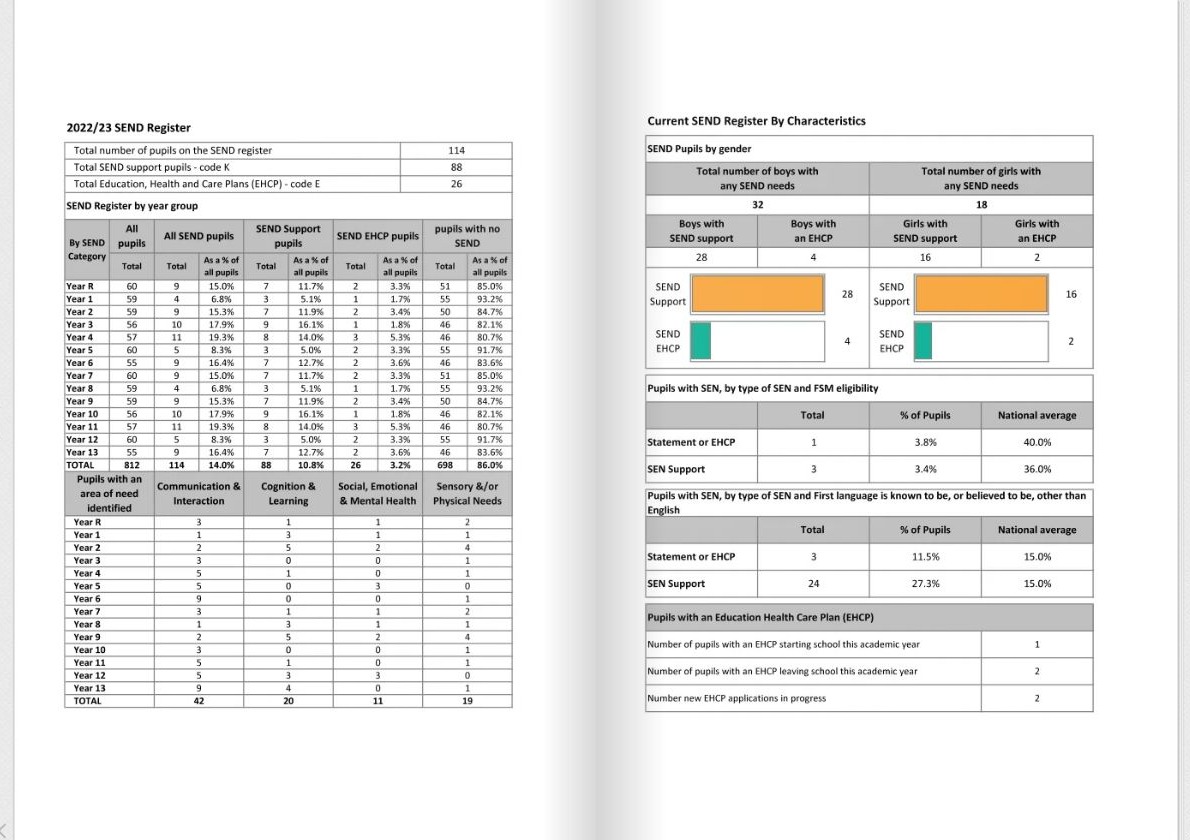
A structured way to bring SEND information together and present governors with a clearer picture of need, provision, assurance and current pressures.
Present SEND Support, EHC plans, year groups, areas of need and pupil characteristics in accessible tables and charts.
Bring policy, statutory assurance, leadership oversight and governor monitoring into one reporting structure.
Record adaptive teaching, interventions, reasonable adjustments, capacity, funding and emerging pressures.
Replace disconnected notes, pupil data and spreadsheets with one consistent report for leaders and governors.
The SEND Report combines quantitative information with school context, provision and leadership assurance.
A straightforward reporting process that combines existing data with the school’s professional knowledge and context.
Use available MIS data and benchmarking to establish the school’s SEND profile and context.
Record assurance, provision, current pressures, funding and matters governors should understand.
Review the completed report, edit the narrative and share a professional summary with governors.
Feedback from schools and trusts using our reporting tools to make evaluation, reporting and governance more manageable.
The whole process has been much more straightforward.
Ian Tett · Headteacher · Oakgrove School
Governors really value it.
Peter Box · CEO · Herefordshire Marches Federation of Academies
I cannot praise highly enough the service received.
Gary Birkett · Headteacher · Newbarns Primary & Nursery School
Unlimited users, training and ongoing support are included.
£190 per year
A flexible annual subscription for your school.
Includes unlimited users, report updates, training and ongoing support.
£150 per year
Three-year subscription, billed annually.
Includes unlimited users, report updates, training and ongoing support.
No. It supports leadership and governance reporting and does not replace statutory policies, pupil plans or the published SEND Information Report.
Where available, relevant pupil-characteristic information is populated from the school’s MIS through the existing data connection.
No. The report can also reflect wider inclusive provision and reasonable adjustments for pupils whose needs may not result in placement on the SEND register.
Yes. Unlimited users are included, allowing the SENCO and other relevant leaders to contribute.
Yes. Training and ongoing support are included within the subscription.
Explore the sample report or book a short online overview to see the data, narrative and assurance sections in action.